Cargo Directions API
Route service allows to make the fastest and the most efficient route between two or more locations (up to 50 waypoints) for cargo (freight) transport.
Routing Engine and Data Sources
The routing engine used is Valhalla, but route calculation and other related services rely on Jāņa sēta road data in Latvia and OSM data in Estonia and Lithuania (OSM contributors). By default, both weight and vehicle dimension restrictions (height, width, length) are taken into account when calculating routes. In addition to static road data, dynamic and virtual weight and dimension restrictions from the Latvian State Roads (LVC) National Access Point (transportdata.gov.lv) are updated daily.
Unlike standard routing, truck routing includes several additional request parameters specifically tailored to the needs and restrictions of freight transport.
If you are interested in using other types of directions services (table, nearest, match, tile), e-mail us!
API URL
The request URL should match the following pattern:
https://api.kartes.lv/v3//directions/cargo/{service}/{coordinates}?
The response is given in JSON
The HTTP GET and POST request methods are used.
Route service
The request URL should match the following pattern:
https://api.kartes.lv/v3//directions/cargo/route/{coordinates}?
Query parameters
The query might consist of the following GET parameters:
| Parameter | Description | Values |
|---|---|---|
| profile | Mode of transportation. | Mandatory
|
| coordinates | String of format {longitude},{latitude};{longitude},{latitude} (up to 50 points) or polyline({polyline}) or polyline6({polyline6}) | Mandatory x1,y1;x2,y2;…;xn,yn, where:
|
| alternatives | Searches for alternative routes. |
|
| geometries | Returned route geometry format. |
|
| steps | Returns route steps for each route leg. |
|
| overview | Adds overview geometry either full, simplified (according to highest zoom level it could be displayed on), or not at all |
|
| continue_straight | Forces the route to keep going straight at waypoints constraining uturns there even if it would be faster. By default, uturns are constrained. |
|
| exclude_unpaved | Willingness to use unpaved roads |
Optional |
| weight | Vehicle weight (t) | Any positive decimal number. Default: 21.77 Optional |
| height | Vehicle height (m) | Any positive decimal number. Default: 4.0 Optional |
| length | Vehicle length (m) | Any positive decimal number. Default: 21.5 Optional |
| width | Vehicle width (m) | Any positive decimal number. Default: 2.6 Optional |
| axle_load | Maximum axle load (t) | Any positive decimal number. Default: 9 Optional |
| axle_count | Number of axles (count) | Integer value. Default: 5 Optional |
| top_speed | Maximum vehicle speed (km/h) | Any positive number. Default: 140 Optional |
| use_ferry | Willingness to use ferries | Any number between 0 and 1. Default: 1 Optional |
| use_highways | Willingness to use highways | Any number between 0 and 1. Default: 1 Optional |
| use_tolls | Willingness to use toll roads | Any number between 0 and 1. Default: 1 Optional |
| use_living_streets | Willingness to use living-street zones | Any number between 0 and 1. Default: 0.5 Optional |
| use_tracks | Willingness to use small rural/track roads | Any number between 0 and 1. Default: 0 Optional |
| ignore_access | Ignore access restrictions (truck access, etc.) | Format: true/false
|
| country_crossing_penalty | Penalty for crossing a national border in seconds (encourages avoiding transit through neighboring countries). The penalty does not affect the route duration calculation. | Format: any positive number between 0 and 10,000. Default: 0. Optional |
| date_time | Timestamp with seconds and time zone. Enables more precise routing outside the current time, taking into account time window constraints as well as average traffic speed. | Format: 2026-04-09T00:00:00Z, 2026-04-09T14:30:00+02:00 Default: current time. Optional |
| date_time_type | Meaning of the provided timestamp |
|
| stop_penalty | Additional time at each route stop (sec) | Optional, default value - 0, not applied to the distance matrix service |
Response parameters
The response consists of the following parameters and objects:
| Parameter | Description |
|---|---|
| code | Request success. Ok if successful. |
| waypoints | Object used to describe waypoint on a route. |
| distance | The distance from the given coordinates to the destination coordinates in meters. |
| location | The coordinates of the location (waypoint, intersection, maneuver) that are used instead of the given coordinates. |
| name | Terminus street name (if any). |
| routes | Object used to describe routes. |
| legs | The legs between the given waypoints, an array of RouteLeg objects. The leg or legs are being followed by distance, duration, weight parameters. |
| steps | Object used to describe steps. There are more parameters for leg. |
| weight | Weight (for prioritization). |
| distance | Length (meters). |
| summary | Descriptive name (for example, "Daugavgrīvas iela, Krišjāņa Valdemāra iela"). |
| duration | Duration (sec). |
| weight_name | Weight name. |
| geometry | The whole geometry of the route value depending on overview parameter, format depending on the geometries parameter. |
| weight | The calculated weight of the route. |
| distance | Length (meters). |
| duration | Duration (sec). |
Status codes
| Status code | Description |
|---|---|
| 200 | Wrong input data. Server can’t respond due to client error. |
| 404 | No location found. The URL is not recognized; the resource does not exist. |
| 5xx | Server error. |
Examples
Input:
https://api.kartes.lv/v3//directions/cargo/route/24.063475,56.815017;24.506378,56.802025?overview=full&steps=true
Response:
{
  "routes": [
    {
      "weight_name": "truck",
      "weight": 1186.615,
      "duration": 1284.275,
      "distance": 30271.357,
      "legs": [
        {
          "via_waypoints": [],
          "admins": [
            []
          ],
          "weight": 1186.615,
          "duration": 1284.275,
          "steps": [],
          "distance": 30271.357,
          "summary": "A5, Rīgas HES–Jaunjelgava"
        }
      ],
      "geometry": "mxujkBoou{l@mWfEkR~Cct@vLw|AjWwLvBo_E~p@wQrDkCz@{OnFwLzEwGrDwBnAcGzEsD~C_IbGoP~Rs|BzyDcBjC{JbLg@RoFzEcG~CsIrDoAf@oFjCoFnA{Ez@gr@nFoKwG_D{E_DsIwB_N?oKf@_IRcQ~f@skCrDgTbt@kkEfm@gyDrv@w|Fns@kbG~MoqAfTczBvQwuBrjAobPnlAkqQ~iAwmPbQcnCzdBocWj\\_{Eb[svE~iAwwPjoC_fa@z@cLbe@wdHr]ccFjz@c_MzTkmDfEcy@bGwhAfJw_CvLsiDbBwy@jCchAbBw~@z@{w@z@co@bBcqDRcuGkC_rBScL?sDgEopDwBccA_SouI_Ic}CwBwcA{@sSs{@ku^_NgzF_I{jDsNs~F_D_tA_DsyA_NsoFoFskC?wLRcGRsDf@sDnAoFjC{JRg@nAcBz@oARg@z@wBz@kCz@_Df@_DR_Df@sD?_DRsDSsD?sDScBS{@SsDg@_D{@kC{@kC{@kC{@wBoAcBoAcBSS_DoFwB{EcBoFoAkHoAoK{@wLcBwQcB{h@wGktCoK{cEwL{kFs]w`OwBsq@kCw~@wBkp@{JkqBsDkz@fEwBrDsD~C{EvBkHbBsIf@cGf@cBRgJ?g@?oAS{E?cBS{@g@kHcBsIkCwG_DcGsDsDgEcB{Eg@{Ef@gJknAoP_|BwGco@oFoi@oFoi@_NkxAgY{}Bs]g}BkWoeB{@sD_yA_uHsXstAwxCcxMsoAg_GkRg|@w`@{dBcrAscGwG{YoZguA_]w|AwQ_`AgTs`AwQgaAcLsv@_Icj@wG{r@kH{|@kCsg@cGsmBg@sl@Rg}BzEgrE?sDzE_lEbB{gCz@obAbGwyEf@stAvB{iBbGk|DbQ{qMzEopDnAgaAjCscBjMceJbB{fArDwmAzE_tAjHwwAjHguAbcAwcPrDgm@fEsl@~HsoAzEsv@rN{xBjk@kpJnA_SrIo`BnPowC?wBrD_{@bBct@?sD~CwuB~CkjC~CwgDjC_xDbBc_Cz@ku@bBsyAR_Sz@soARco@f@s]f@w~@R{^Rce@nA{pAz@kz@z@knAbGsrGRsXbBg}B~CouDnFggHrIg}L~CcuBrIwbDrDwt@~HolAbG_`AbL_tAnPoeBnKkdArDc`@v`@kaE~p@kvGb`@{eDfTc|AvV_~Aja@{sB~z@snD~a@guAzr@w_CbGgTnKo_@~k@wpBrI{Y~_AowCv`@wmAjM_b@vBkHf@cBz{C_eKvt@o~BzbCofIjW_v@bmAceEzm@{lCjCoPve@{vCbBoKpL{I"
    }
  ],
  "waypoints": [
    {
      "distance": 14.43,
      "name": "Baloži–Plakanciems–Iecava",
      "location": [24.06324, 56.814999]
    },
    {
      "distance": 8.933,
      "name": "",
      "location": [24.506244, 56.801993]
    }
  ],
  "code": "Ok"
}
Use examples
Example of implementing the Directions API in a Leaflet map.
First, you need to include the Leaflet library in your HTML code (you should use the latest version of the library, according to the official documentation):
<link rel="stylesheet" href="https://unpkg.com/leaflet@1.9.4/dist/leaflet.css"
    integrity="sha256-p4NxAoJBhIIN+hmNHrzRCf9tD/miZyoHS5obTRR9BMY="
    crossorigin=""/>
<script src="https://unpkg.com/leaflet@1.9.4/dist/leaflet.js"
    integrity="sha256-20nQCchB9co0qIjJZRGuk2/Z9VM+kNiyxNV1lvTlZBo="
    crossorigin=""></script>
You can create a map element in HTML:
<div id="map" style="width: 100%; height: 100vh;"></div>
Then, you can initialize the map in JavaScript and create a class for the Directions API:
const api_key = 'your_api_key_here'; // Replace with your actual API key

const map = L.map('map', {
    layers: [
        L.tileLayer.wms(`https://wms{s}.kartes.lv/${api_key}/wgs/15bw/`, {
            subdomains: ['', '1', '2', '3', '4'],
            attribution: '<a href="https://balticmaps.eu" target="_blank">Jāņa sēta</a>',
        }),
    ],
    center: [56.96, 24.11],
    zoom: 12,
})

class DirectionsApi {
    constructor() {
        this.apiKey = api_key;
        this.baseUrl = 'https://api.kartes.lv/v3';
    }

    // Method to fetch directions
    async getDirections(coordinates, options = {}) {
        const coords = coordinates.map(innerArray => innerArray.join(',')).join(';');

        // Allow various options to be passed to the API
        const queryString = new URLSearchParams({
            overview: options.overview || 'full',
            steps: options.steps || 'true',
            geometries: options.geometries || 'geojson',
            source: options.source || 'first',
            destination: options.destination || 'last',
        }).toString();

        const url = `${this.baseUrl}/${this.apiKey}/directions/cargo/route/${coords}?${queryString}`;

        try {
            const response = await fetch(url);

            // Check if the response is ok (status code 200-299)
            if (!response.ok) {
                throw new Error(`Error fetching data: ${response.statusText}`);
            }

            const data = await response.json();
            return { success: true, data };
        } catch (error) {
            console.error('Fetch error:', error);
            return { success: false, error: error.message };
        }
    }
}
To display the route in a Leaflet map, you need to convert the route to GeoJSON format. You can do it using a function like this, which writes the entire route, its legs, and waypoints in GeoJSON format:
const convertToGeoJSON = (data) => {
    if (data.code !== "Ok") {
        throw new Error("Invalid data");
    }

    const geojson = {
        type: "FeatureCollection",
        features: []
    };

    // Convert trips to GeoJSON features
    data.trips.forEach(trip => {
        // Add the main trip route as a LineString
        geojson.features.push({
            type: "Feature",
            geometry: trip.geometry,
            properties: {
                type: "trip",
                weight: trip.weight,
                duration: trip.duration,
                distance: trip.distance
            }
        });

        // Add each step in the trip as a separate feature
        trip.legs.forEach(leg => {
            leg.steps.forEach(step => {
                geojson.features.push({
                    type: "Feature",
                    geometry: step.geometry,
                    properties: {
                        type: "step",
                        mode: step.mode,
                        maneuver: step.maneuver,
                        name: step.name,
                        duration: step.duration,
                        distance: step.distance,
                        drivingSide: step.driving_side,
                        intersections: step.intersections
                    }
                });
            });
        });
    });

    // Convert waypoints to GeoJSON features
    data.waypoints.forEach(waypoint => {
        geojson.features.push({
            type: "Feature",
            geometry: {
                type: "Point",
                coordinates: waypoint.location
            },
            properties: {
                type: "waypoint",
                waypoint_index: waypoint.waypoint_index,
                trips_index: waypoint.trips_index,
                distance: waypoint.distance,
                name: waypoint.name
            }
        });
    });

    return geojson;
}
Finally, you can use the DirectionsAPI class to fetch the route and display it on the map:
// Instantiate the DirectionsAPI class with your API key
const api = new DirectionsAPI(api_key);

// Example stops
const coordinates = [
    [24.063475, 56.815017],
    [24.506378, 56.802025],
    [23.792679, 56.768295]
];

api.getDirections(coordinates)
    .then(result => {
        if (!result.success) {
            console.error('Error:', result.error); // Handle the error
            return;
        }

        // Add the route in GeoJSON format to the map
        L.geoJSON(convertToGeoJSON(result.data), {
            style: (feature) => {
                color: "rgba(20, 137, 255, 0.7)",
                weight: 5
            }
        }).bindPopup((layer) => `${layer.feature.properties.distance} m`}).addTo(map);
    });
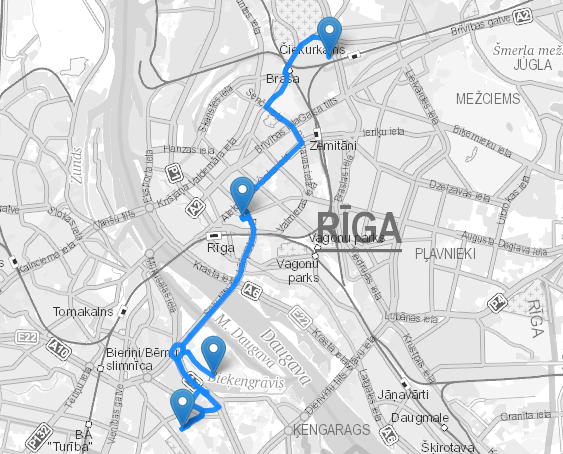
The result will be a map with the route displayed on it.